

You’ll know if it was the page or the ads
Before you touch anything. Daily snapshots show whether the page your ad points to still looks like it did when the campaign was working.
FOR ADVERTISERS & MEDIA BUYERS
Something changed after the click. You can’t see it in Ads Manager, but it’s showing up in your CPA. URL Love It takes a daily snapshot of the pages your ads send people to, so you can see what changed and when.
$1 first month · Then plans from $49/month. Cancel anytime.
$1 intro offer for eligible new monthly subscribers.
One a day for every page you choose
Public pages, no tracking snippet
Every page change, in one place
Lifetime history on Brand Pro
SOUND FAMILIAR?
“A campaign runs beautifully for three months. You’re feeling competent. Dare I say, smug. Then CPA jumps 40% in a week, you swap the creative, reset the ad set, and nothing moves. Two weeks later someone mentions the dev team “cleaned up” the landing page.”
“The client swears they didn’t touch anything. The client always swears they didn’t touch anything. (The promo banner quietly expired on Tuesday.)”
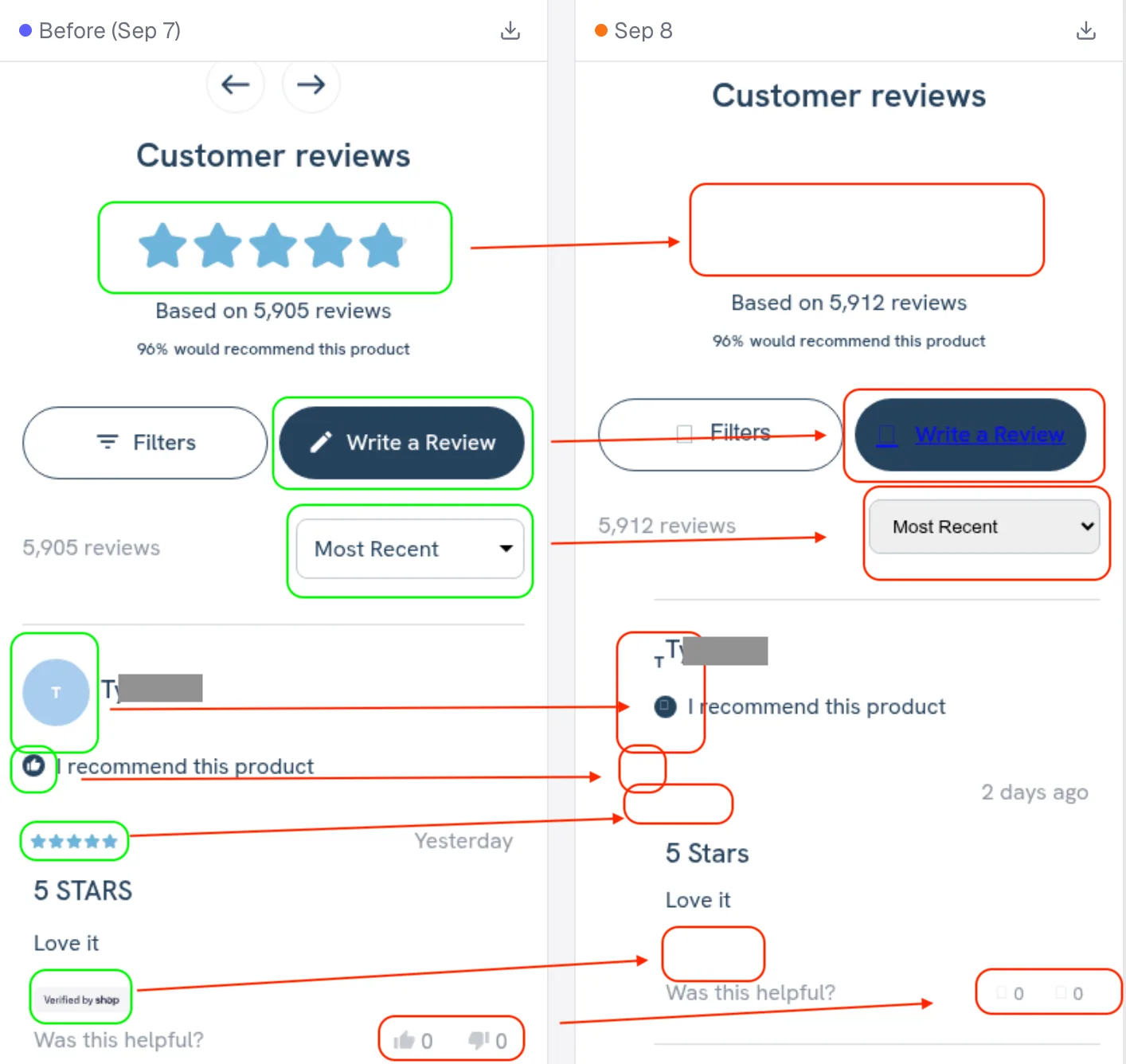
“You spent a whole Monday rebuilding audiences. The real problem? The reviews widget on the product page had stopped loading. Ask me how I know.”
YOU CAN’T SEE IT IN ADS MANAGER. BUT YOU’RE PAYING FOR IT.
“Most marketers blame the ads when performance drops. Half the time, it’s the website that changed.”
 Barry Hott, Founder, URL Love It
The media buyer says creative fatigue. The strategist says the algorithm. Someone suggests more budget. (Because apparently that’s the answer to everything now.)
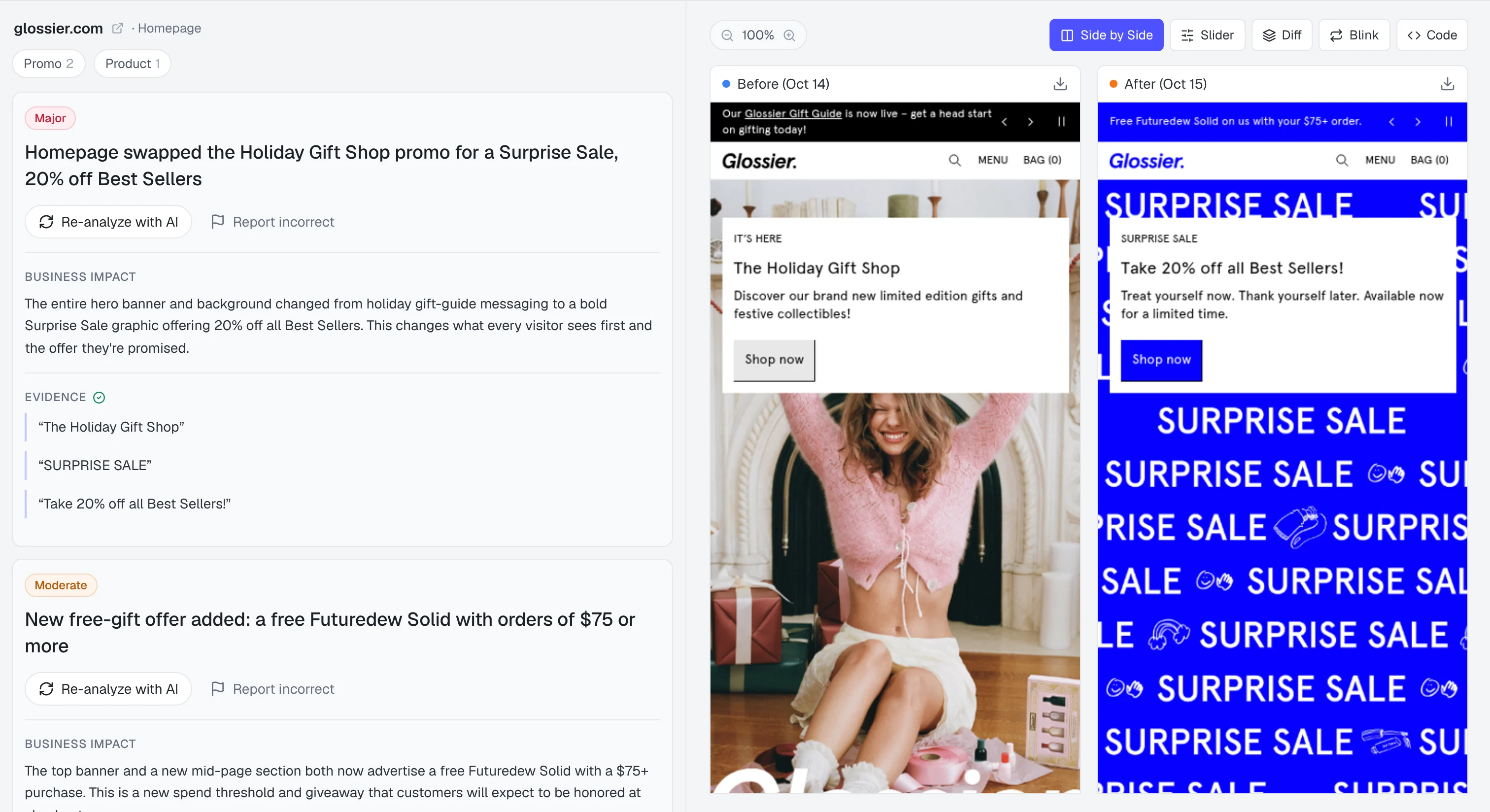
Meanwhile, nobody is looking at the page. The offer expired. The headline got rewritten. The hero image swapped. The ad still promises the thing the page stopped saying.
It’s not incompetence. Ads Manager just doesn’t show you the page. So we learned to react: swap the creative, raise the budget, reset and pray.
See what changed on my pagesTHE DIFFERENCE
No judgment. We’ve all been there.
THE OUTCOME
There’s a lot of relief. We should mention that upfront.
Before you touch anything. Daily snapshots show whether the page your ad points to still looks like it did when the campaign was working.
Dated history turns “sometime last week” into “Tuesday, when the promo banner came down.”
AI change analysis calls out the headline, offer, imagery, and CTA changes worth a look, so you’re not playing spot-the-difference at 11pm.
The difference between “we’re still looking into it” and “here’s what changed on Tuesday.” One closes the conversation. The other schedules another meeting.
THE SYSTEM BEHIND THE “GOOD CATCH”
Real pages. Real changes. Real “oh, that’s what happened.”
 Caught by URL Love ItCLIENT PRODUCT PAGE · SEP 7–8
“This is gonna save me so much sleep and probably make me more accountable to screwing around with stuff now that I know something is watching me”
“I’ve been the person trying to explain a performance drop to a client without knowing their website had changed. An offer had been edited. A review platform had stopped loading.”
WHAT YOU GET
Setup takes less time than your last “quick sync” that somehow went 90 minutes.
Mobile by default, desktop when you want it. Every page you choose, every day.
Each new capture is compared to the last, so changes surface on their own.
Plain-English notes on what moved: headline, offer, imagery, CTA.
Changes reach the people who need to know, where they already are.
Watch public competitor pages from the same workspace.
Find the destinations your ads actually send traffic to.
YOUR NEXT CLIENT CALL
Choose your own adventure, but one adventure is significantly less painful.
THE MATH
The math is mildly infuriating when you see it laid out.
Then from $49/month. Cancel anytime.
Get instant accessYou’ve spent more than this on a single “team morale” lunch that fixed nothing.
Illustrative figures for a mid-size ad account, not a promise of savings. Page changes are evidence to investigate, not proof of what caused a performance shift.
PLANS & PRICING
Every monthly plan starts at $1 for your first month. Cancel anytime.
$49/mo
For new brands
Start for $1$149/mo
For growing brands
Start for $1$399/mo
For agencies
Start for $1Let’s talk
For large teams
Contact us$1 intro offer for eligible new monthly subscribers.
BEFORE YOU START
Eligible first-time paying customers get their first month of a monthly plan for $1. After that, Brand Starter is $49/month and Brand Pro is $149/month. You choose a plan and see the full price during setup. Applicable taxes may be added at checkout.
Brand Starter and Brand Pro capture daily. This is scheduled monitoring, not a real-time uptime service. Each page and viewport uses a capture, so monitoring desktop and mobile uses more of your monthly allowance.
It shows what changed on the pages you monitor and provides AI analysis to help you investigate. It does not prove that a particular change caused a performance shift, and it does not guarantee detection of every issue.
No tracking snippet is needed for public-page monitoring. Start with your website and choose the URLs to watch. Some protected pages may limit capture or text extraction.
Yes. You can add public competitor pages as well as your own. Brand Starter includes one brand; Brand Pro includes three, which can cover your business and competitors.
Yes. Cancel your subscription from billing settings. Access continues through the end of your paid billing period. There is no annual commitment when you choose monthly billing.
THE TRIFECTA
Your next “what happened to performance?” conversation is already on the calendar. Check the page before you walk in. Show up knowing.